Page 12 of 23

Some Thoughts on iPadOS

A personal view
by James “MacJim” Ormiston

Back then:

Ten years ago, Steve Jobs cast his spell over an enthralled audience when he announced the iPad on stage, a device that previously had been the work of science fiction in shows such as Star Trek, The Next Generation; where tablet devices abound. Granted, Apple wasn’t the first to attempt bringing tablet devices to market but they were the first to make a success of it killing off almost all of the competition over time. 

Back then, there was no iPadOS, just plain old iOS developed for the iPhone and its small screen. Back then; it was all we needed as the iPad was in its infancy; being a simple consumer device aimed more at dealing with email, web browsing and rudimentary photo editing. Remember, the internet was nothing like what we have now. The ‘future’ iPad in the form of the Pro versions was still far away in the future; the future we are now living in, and that is where today’s problems lie. 

Now:

With multitasking, more than one window open at any time, copy and paste, drag and drop and access to external storage that Apple is now trying to add to emulate the way a computer works, iOS is starting to show limitations due to its early beginnings. With each iteration of iOS more and more features and complexities are added in. Ever more powerful processors have helped, but it really hasn’t taken into count the way the interface would ultimately get ‘bogged down’ due to the awkward way these new features have to work in a restricted OS, which in the end slows the user down. 

Continue reading → Some Thoughts on iPadOS

Essential Apple Podcast 166: A show with no notes?

Not a great deal of Apple News, except the growing expectation Apple might not be able to do WWDC in the same way as previous years, and a free fix for owners of iPad Air 3s with troublesome screens. Meanwhile Intel reveal that there is a dangerous flaw in their chip management module that can’t be fixed, Virgin Media might be in hot water with the GDPR, Microsoft say 99.9% of hacked accounts make the same mistake, and TCL showed off an interesting “rollable extendable phone concept”. Simon and Nick consider these and wander off into a few other bits and pieces as well (as they often do).

GIVEAWAYS & OFFERS

  • Get Donny Yankellow’s 2FunDads iMessage stickers for FREE

Why not come and join the Slack community? You can now just click on this Slackroom Link to sign up and join in the chatter!

Slacker @MacJim has a family friendly Flickr group for listeners to share photos because the Darkroom channel in the Slack has become so popular – if you’re interested head over to to the Essential Apple Flickr and request an invitation.

Continue reading → Essential Apple Podcast 166: A show with no notes?

Essential Apple Podcast 165: Rampant speculation

This week would have been Steve Jobs’ 65th birthday, the product turned verb Photoshop passed 30, the StyleWriter is 29 and speculation about ARM Macs is running rife. Also the novelcoronavirus COVID-19 continues to wreak havoc. To talk about all this I am joined by Nick Riley for a lot of speculation as to what it all means!

GIVEAWAYS & OFFERS

  • Get Donny Yankellow’s 2FunDads iMessage stickers for FREE

Why not come and join the Slack community? You can now just click on this Slackroom Link to sign up and join in the chatter!

Slacker @MacJim has a family friendly Flickr group for listeners to share photos because the Darkroom channel in the Slack has become so popular – if you’re interested head over to to the Essential Apple Flickr and request an invitation.

Continue reading → Essential Apple Podcast 165: Rampant speculation

Essential Apple Podcast 164: Back from the dead

After two weeks “down and out” due to my MacBook Pro charger unexpectedly failing on me literally a couple of hours before the recording time on the 9th (and the replacement I ordered failing to show in time for the following week) the show is back from the dead. Lessons to be learned there I think… ) All the usual crew are otherwise engaged’, so it’s just me mulling over a few things that caught my attention over the last couple of weeks.

GIVEAWAYS & OFFERS

  • WINNERS of the MotoMagico for iPad Subscriptions are:
    Eric Rogers and Steven Welton
  • Get Donny Yankellow’s 2FunDads iMessage stickers for FREE

Why not come and join the Slack community? You can now just click on this Slackroom Link to sign up and join in the chatter!

Slacker @MacJim has a family friendly Flickr group for listeners to share photos because the Darkroom channel in the Slack has become so popular – if you’re interested head over to to the Essential Apple Flickr and request an invitation.

Continue reading → Essential Apple Podcast 164: Back from the dead

Essential Apple Podcast 163: A Decade of iPad

This week Nick and Jim join me as we ponder a decade of iPad, gasp at Apple’s awe inspiring revenues, consider whether Jony jumped ship or got pushed overboard, wonder if subscriptions are a viable long term business strategy and talk about whether or not the EU should demand everyone uses the same charge cable… Plus new listener feedback and don’t forget there is still time to put your name in the hat to win a year’s subscription to FotoMagico for iPad.

GIVEAWAYS & OFFERS

  • Oliver has given us 2x One Year Subscriptions to the new FotoMagico for iPad to give away.
    Usual thing – email essentialapple@sudomail.com (mailto:essesntialapple@sudomail.com) and winners will be drawn out of the hat in about 3 weeks
  • Get Donny Yankellow’s 2FunDads iMessage stickers for FREE

Why not come and join the Slack community? You can now just click on this Slackroom Link to sign up and join in the chatter!

Slacker @MacJim has a family friendly Flickr group for listeners to share photos because the Darkroom channel in the Slack has become so popular – if you’re interested head over to to the Essential Apple Flickr and request an invitation.

Continue reading → Essential Apple Podcast 163: A Decade of iPad

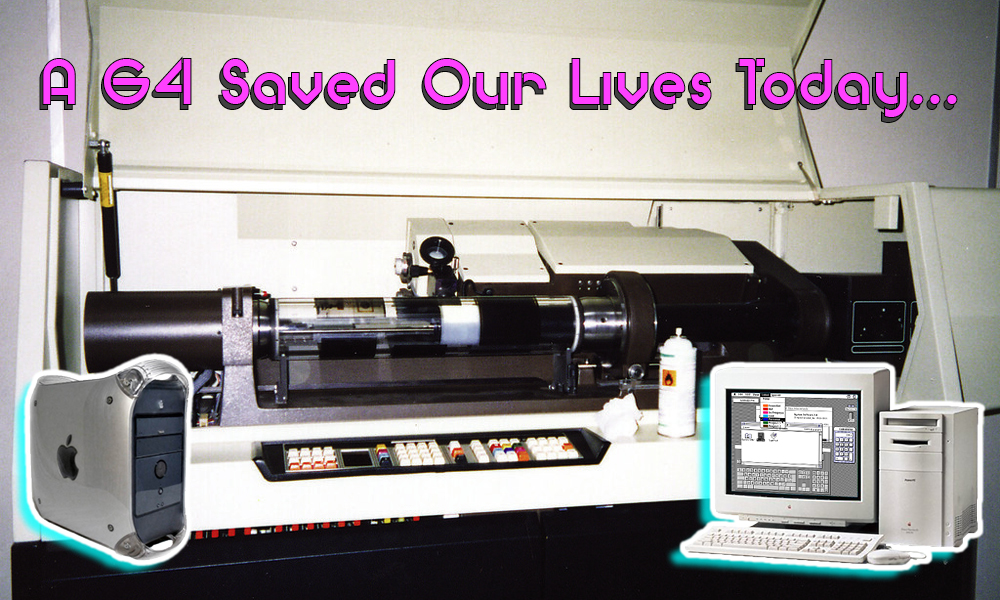
A G4 Saved our lives today…

With apologies to Elton John and In Deep for mangling their song titles

crosfield inside 440x440 A G4 Saved our lives today...
Crosfield Drum scanner similar to ours

OK the headline is hyperbole… But sorry, not sorry! So this is how the story goes. At work we have a Crosfield drum scanner – possibly the last one in action for hundreds of miles (this is piece of kit that cost well over £150k maybe 30 or more years ago). Drum scanners were the essential “pro” element of print reprographics for many years – they were how we got transparencies and photos into colour separations (and a later digital form) before desktop scanning was a thing; and for decades after that it was still the “pro” version…

apple m1688 power mac 810080 tower 1.20  39788.1490241836 1 339x440 A G4 Saved our lives today...
Power Mac 8100 in about the same state of repair as ours!

Anyway to the story – the Crosfield is powered by a very very old Mac – a PowerMac 8100/100 to be precise – because when the scanner was converted to digital that was the Mac that accepted the interface card that allowed it to talk to the Mac and the software needed to drive the scanner (I’ll come back to that in a bit). It used to do more, like colour correct scans, but modern Macs have overtaken the capabilities of its (admittedly specialist, but old) software.  

Continue reading → A G4 Saved our lives today…

Browser Fingerprinting. What Is It and What Should You Do About It?

A guest post from the Pixel Privacy Blog.  

Read the original post here


Have you ever heard of browser fingerprinting? It’s okay if you haven’t, since almost nobody else has ever heard of it, either.

Browser fingerprinting is an incredibly accurate method of identifying unique browsers and tracking online activity.

Luckily, there are a few things you can do to wipe all of your fingerprints from the internet. But first, let’s start by exploring what, exactly, browser fingerprinting is.

Browser Fingerprinting: What Is It?

Browser fingerprinting is defined on Wikipedia as follows:

“A device fingerprint, machine fingerprint or browser fingerprint is information collected about a remote computing device for the purpose of identification. Fingerprints can be used to fully or partially identify individual users or devices even when cookies are turned off.”

That means that, when you connect to the internet on your laptop or smartphone, your device will hand over a bunch of specific data to the receiving server about the websites you visit.

Browser fingerprinting is a powerful method that websites use to collect information about your browser type and version, as well as your operating system, active plugins, timezone, language, screen resolution and various other active settings.

These data points might seem generic at first and don’t necessarily look tailored to identify one specific person. However, there’s a significantly small chance for another user to have 100% matching browser information. Panopticlick found that only 1 in 286,777 other browsers will share the same fingerprint as another user.

Websites use the information provided by browsers to identify unique users and track their online behavior. This process is therefore called “browser fingerprinting.”

Continue reading → Browser Fingerprinting. What Is It and What Should You Do About It?

Essential Apple Podcast 162: Happy Birthday Macintosh & Other Amazing Tales

This week the Macintosh turned 36, Apple started removing Flash from Safari, Google say some of Apple’s anti-tracking made things worse, and Uncle Tim said AR will “pervade our entire lives”. Meanwhile claims were made that Apple gave up on fully encrypting iCloud due to pressure from the FBI, Sonos got themselves into hot water with a poorly managed statement about support for older tech and Apple pledge to support the fight against the Corona virus and Space Force’s badge seems strangely familiar to many! Also I forgot to mention it but DON”T FORGET to enter the FotoMagico for iPad giveaway!

GIVEAWAYS & OFFERS

  • Oliver has given us 2x One Year Subscriptions to the new FotoMagico for iPad to give away.
    Usual thing – email essentialapple@sudomail.com and winners will be drawn out of the hat in about 3 weeks
  • Get Donny Yankellow’s 2FunDads iMessage stickers for FREE

Why not come and join the Slack community? You can now just click on this Slackroom Link to sign up and join in the chatter!

Slacker @MacJim has a family friendly Flickr group for listeners to share photos because the Darkroom channel in the Slack has become so popular – if you’re interested head over to to the Essential Apple Flickr and request an invitation.

Continue reading → Essential Apple Podcast 162: Happy Birthday Macintosh & Other Amazing Tales

ProtonMail: How to create a strong password

A guest post from the ProtonMail Blog

You probably already know some obvious password safety tips, like don’t use “password” as your password. But did you know that a password like “Ch@ll3ng3r%$” is not much more secure? Sure, it mixes upper- and lower-case letters, numbers and special characters, like you’re often advised to do when creating a password for a new account. And yet a hacker could crack it using a dictionary attack in an hour or two. “Challenger” is a common base word, and the modifications are too simplistic to fool most hackers.

You may be thinking that no hacker would bother attacking you personally, and you’re probably right. The danger is not that a hacker will target you, but rather that your password will be part of a larger data breach. If you use a weak password, hackers can extract it from the database along with all the other weak passwords.

Therefore, your goal is to create a password that will be difficult for a hacker with a powerful computer to crack, while also being simple enough to memorize. This article will explain exactly how to do that, as well as offer some advice on what to do with your strong password once you’ve thought of it. But first it’s helpful to understand a bit about how online services use passwords to manage account access and how hackers can steal your credentials.

Continue reading → ProtonMail: How to create a strong password

Auslöser: Trigger 

A Short Review
by James “MacJim” Ormiston

Over the years, I’ve bought many different photography magazines, and many have either withered and died or became very different from what they were when I first read them. It’s truly amazing what a new editor can do for the future of a magazine as he or she stamp their mark on the product. Some were very successful, for a time, bringing in more and more new readers to the fold but in making those changes chased away many of the older stalwarts that help keep the magazine afloat. 

I myself have seen this happen many times where a new editor has made the changes that finished me with that magazine, or due to some daft ideas that the publisher has had, such as turn the magazine into a bi-monthly one, was a sure sign that all was not well: one such magazine was Professional Photography magazine where the publisher did exactly that. Then it began to miss the publication dates, sometimes by almost a month, or could only be found through an online seller, I knew this was a signal that that magazine was soon to die: which it did finishing with a strange compendium of old stories. Other magazines became what I’d call coffee table magazines where they were visually impressive, but were filled with tutorials, and very light on product reviews and interviews with professional photographers. Nowadays I read three photography magazines; one a dead tree issue, Cameracraft magazine (out four times a year), and two PDF-only magazines; Fuji X-Series and FujiLove both of which are monthly issues. Auslöser Page 1 Image 0001 Auslöser: Trigger 

I can’t remember how I came across this magazine, Auslöser (German for trigger), it may have been through an email from someone but I thought I’d check it out. A search online found the site for the magazine, I clicked the link and discovered it’s been out for almost a year and was now at issue two… No, you haven’t misread, issue two as it is a biannual magazine. Having no idea what to expect from this magazine; was it interesting to me? Would it fulfil my needs in photography?  Could it replace Professional Photography magazine as my go-to read? and is it worth the cost as its not an inexpensive purchase? 

Continue reading → Auslöser: Trigger 

The Most Dangerous Apps for Kids

A guest post with infographic
from the Swift Tech Buy Blog

Cool Features for Kid-Friendly iPhones

In the past, parents didn’t have to make tough decisions concerning their kid’s use of technology. However, much has changed, and kid’s mobile phone safety is a new role for all. Kids use their iPhones to interact with friends, share photos, play games, and search for information online. Nonetheless, there are various gadgets adored by kids, and you have to pick one with mobile child safety features.

Check out the best iPhone features to look out for:

1. Web filtering

A web filtering characteristic is one of the essential mobile child safety features. It enables you to block the sites that you don’t want your child to access even without parental control software. If your kid’s iPhone is broken and faulty, making you unable to turn on the web filtering feature, do away with it and acquire a better device. But how do I go about this? By searching “sell my broken phone,” you’ll get swifttechbuy.com and many other websites where you can trade your iPhone instantly.

2. GPS feature

Although there are various ways on how to monitor kids iPhone, GPS tracker is a plus for any mobile phone. Such a feature offers unbelievable peace of mind for most parents. With a GPS tracker, you can quickly locate your child using their mobile. Besides, some kids communicate with strangers online and also plan meetings, but with this feature, you will be aware of suspicious places visited.

Bottomline

Almost all iPhones come with amazing mobile child safety features. But it’s your role not only to pick a device that enhances your child’s safety but also match your child’s needs. Ensure that your child’s mobile can track the kid’s location and can easily bar websites containing inappropriate content.

Infographics Header The Most Dangerous Apps for Kids

To see the rest of the infographic click more.

Continue reading → The Most Dangerous Apps for Kids

Essential Apple Podcast 161: Slip sliding away with FotoMagico

This week Gary Starkweather, the inventor of the laser printer, passed away, Apple discovered their Smart Battery Cases are maybe not so smart, and Windows 7 went out to pasture. I am joined by Nick Riley and guest Oliver Breidenbach of Boinx and we talk about the new FotoMagico for iPad that was just released and a a few other bits of Boinx software, before we meander on to Apple trade ins, discuss more battery technology stories and ponder over AR a bit more.

GIVEAWAYS & OFFERS

  • Oliver has given us 2x One Year Subscriptions to the new FotoMagico for iPad to give away.
    Usual thing – email essentialapple@sudomail.com (mailto:essesntialapple@sudomail.com) and winners will be drawn out of the hat in about 3 weeks
  • Get Donny Yankellow’s 2FunDads iMessage stickers for FREE

Why not come and join the Slack community? You can now just click on this Slackroom Link to sign up and join in the chatter!

Slacker @MacJim has a family friendly Flickr group for listeners to share photos because the Darkroom channel in the Slack has become so popular – if you’re interested head over to to the Essential Apple Flickr and request an invitation.

Continue reading → Essential Apple Podcast 161: Slip sliding away with FotoMagico

Under the weather – feeling slightly “nauCES”…

Sorry there is no show this week… basically no one was available and to be honest all the news was pretty much stuff from CES, and there are plenty of quality podcasts from people who actually attended such as Techpinions, The Vergecast, The Gadget Lab and many many more.

To be honest I wasn’t actually feeling 100% myself either, in fact you could say I was feeling slightly “nauCES” (sorry!!!!!) – so rather than do a lacklustre show relaying third hand news I thought it better to just abandon the show and take a restorative nap!

All should be good for next week though… so thanks for your patience and forbearance.

Essential Apple Podcast 160: A New Year’s Ramble

I am joined by Nick Riley and James Ormiston (MacJim) and with no real news as such we just have a ramble around some things that come to mind as we chat.

GIVEAWAYS & OFFERS

  • Listeners of this show can claim $10 off purchases of Luminar and/or Aurora HD 2019 use the coupon code EssentialApple at checkout for your extra discount!
  • Get Donny Yankellow’s 2FunDads iMessage stickers for FREE

Why not come and join the Slack community? You can now just click on this Slackroom Link to sign up and join in the chatter!

Slacker @MacJim has a family friendly Flickr group for listeners to share photos because the Darkroom channel in the Slack has become so popular – if you’re interested head over to to the Essential Apple Flickr and request an invitation.

Continue reading → Essential Apple Podcast 160: A New Year’s Ramble

Essential Apple Podcast 159: Merry Christmas Everyone!

Donny is (mostly) recovered from the ‘flu, MacJim braves another appearance and Suffolk Pete pitches in so we can have a “proper show”. Unsurprisingly news is thin on the ground on the whole with the blogs and such being full of “year in review” and “best of the decade” stuff. However we found a few stories to talk about including a “secret Apple satellite team”, more info on the Blue membrane, a Cobalt free EV battery and Zuck wanting to make a Facebook OS…

GIVEAWAYS & OFFERS

  • Listeners of this show can claim $10 off purchases of Luminar and/or Aurora HD 2019 use the coupon code EssentialApple at checkout for your extra discount!
  • Get Donny Yankellow’s 2FunDads iMessage stickers for FREE

Why not come and join the Slack community? You can now just click on this Slackroom Link to sign up and join in the chatter!

Slacker @MacJim has a family friendly Flickr group for listeners to share photos because the Darkroom channel in the Slack has become so popular – if you’re interested head over to to the Essential Apple Flickr and request an invitation.

Continue reading → Essential Apple Podcast 159: Merry Christmas Everyone!