macOS Golden Gate – What’s New
 essentialapple
11 min read
essentialapple
11 min read
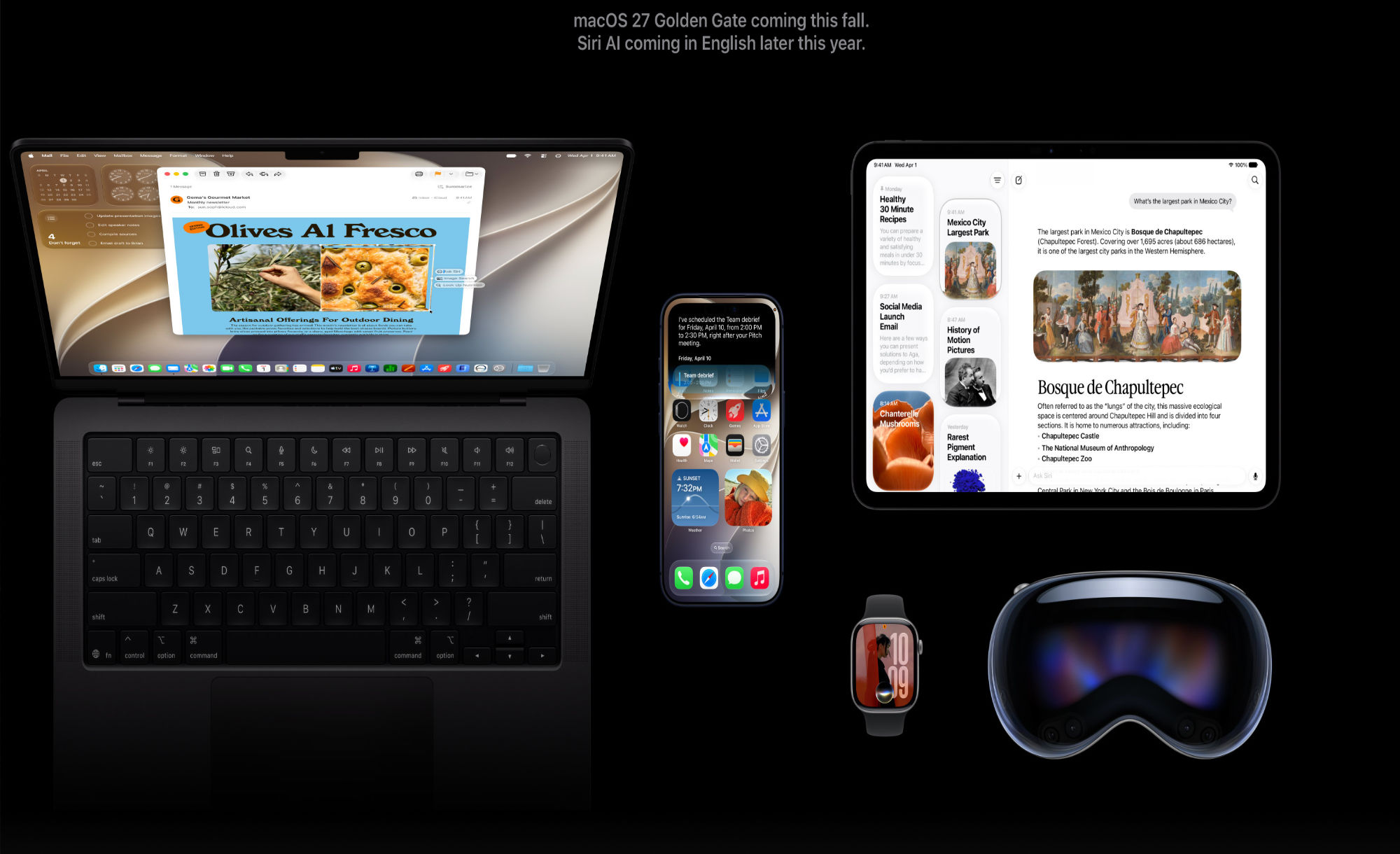
macOS 27 Golden Gate is the latest version of macOS, the software that runs on the Mac. Apple demoed macOS Golden Gate at WWDC, and it’s now available to developers. A public beta is coming in July, with a launch to follow this September.
Apple is revisiting Liquid Glass in macOS Golden Gate. There’s a Liquid Glass slider for controlling the transparency of Liquid Glass elements, so you can opt for maximum translucency or a tinted version that is more opaque for increased legibility. Apple also updated Liquid Glass opacity so it diffuses complex content more effectively. A darkened edge and brighter highlights offer more depth and separation for the UI, plus changes to window shadows make it easier to tell when a window is active.
Apps now have uniform toolbars to make text headings and controls easier to read, and all windows have the same corner radius for improved consistency. The super rounded corners that people disliked in macOS Tahoe are gone. Sidebars are no longer floating and now extend edge-to-edge, with Apple also bringing back colored sidebar icons. App icons have been updated with more Liquid Glass layers to improve detail and sharpness. Apple is also using HDR for depth and dimension in the macOS Golden Gate interface.
macOS Golden Gate incorporates Siri AI, an overhauled version of Siri that’s much smarter and more capablethan before. Siri AI uses generative AI models and it performs more like ChatGPT or Claude than the prior version of Siri. Siri can hold full back-and-forth conversations, and it has access to your personal data so it knows more about you and can complete complex tasks. It can search across Mail, Messages, Notes, Reminders, Calendar and other apps to find things for you. Siri has broad world knowledge and can search the web to answer questions for you on any topic, plus it is able to see what’s on your screen so you can ask for more information about what you’re looking at. Siri can also take action in apps, doing things like drafting emails, adding events to Calendar, and adding Photos to an album.
There is a standalone Siri app where you can talk to Siri, revisit existing conversations, and see a history of your chats. On the Mac, Siri lives in Spotlight. Bringing up Spotlight with the Command + Space shortcut launches the Siri Search or Ask interface. You can type to Siri from Search or Ask, and you’ll see a new Siri animation while Siri thinks. Concise Siri responses show up in Spotlight, and you can click for more information or to ask a follow-up question. Files and photos can be uploaded by clicking on the “+” button. On Macs with an M3 chip or newer, you can set a custom voice for Siri, with personalized pace and expressivity. Newer Macs also support improved dictation capabilities with special on-device AI models.
Visual Intelligence expanded to the Mac. You can get to it with a new Command + Shift + Space keyboard command. Once activated, you can select an area of your display that you want to know more about and Siri can answer any questions you have. Siri is integrated into apps with systemwide context menus so you can select text or images and then ask Siri about your selection.
A Write with Siri feature lets Siri generate text from scratch, correct your grammar, or give feedback on your writing. Siri can even write in your own style when composing email and text messages.
The Photos app has AI photo editing tools. Clean Up is better at removing objects from images and filling in missing areas, and there are Reframe and Extend options. Extend lets you change the crop of an image, using AI to generate new fill, while Reframe combines AI and spatial images so you can change the perspective or composition of a photo. iCloud Shared Albums support full-resolution sharing, and friends with Android and Windows devices can contribute images to iCloud albums. There’s also a new 30-day expiration option and an option to sync content immediately to iCloud for quicker uploads.
Any set of photos or videos can be played as a slideshow, and you can save a video frame as a photo. Apple added a Captured by Me collection in the Photos app. With the new Selection View, you can review and modify metadata like location for multiple images, and there is support for keywords and star ratings. The Notes appsupports more formatting styles, and you can use the trackpad to add handwritten sketches or notes. Copy and paste in Markdown is available, and there are divider lines for richer notes. You can navigate to specific sections in notes with Section Links.
Safari can automatically organize tabs, bookmarks, and Reading List by topic, create custom extensionsfor you based on natural language prompts, and monitor webpages for changes with Notify Me, letting you know when an update is detected. The Passwords app uses AI to change weak and compromised passwords for you, upgrading them to strong passwords. When saving files or folders, Apple Intelligence will suggest names based on content.
Image Playground was overhauled, and it generates images in any style, including photorealistic. You can create images of people, modify images using descriptions for small changes, and make tweaks with touch gestures. Apple also updated Genmoji to be faster and better quality. Image generation and similar resource-intensive AI features will have daily usage caps with more access tied to paid iCloud+ plans, but Apple’s AI features will be otherwise free.
The Shortcuts app can create shortcuts for you based on natural language requests. Just tell it what you want a shortcut to do, and the app will generate it automatically with AI. Calendar and Reminders support natural language for adding and modifying events and tasks. The Maps app uses aerial imagery and Vision Intelligence models for Flyover with sharper, more lifelike detail. The Journal app supports generative writing prompts for writing inspiration.
In the Home app, HomeKit Secure Video supports 4K streaming, and it uses AI to summarize activitiesfrom video footage. Multiple notifications are aggregated, and it can stitch together footage from multiple cameras for a complete picture of what’s happening. It also supports searching for specific moments.
Mail makes intelligent suggestions for taking action on content with apps, and in Messages, there are AI suggestions for actions you might want to take like inserting a photo or sharing a location. Sending large photos and videos no longer slows text conversations, and there is a send indicator for outgoing messages. Tapback notifications are now consolidated, so you get fewer notifications. Message syncing across devices has improved, eliminating duplicate alerts on Mac.
The Phone app has Call Context, a feature that brings up relevant on-device information you might need when calling a business for help, like a flight number. The Music app has new artist pages and AutoMix has smoother transitions. The Clock app supports setting alarm volume independent of system volume. The Mac Podcasts appnow supports video podcasts with full playback controls, Picture in Picture, and download capabilities.
Apple focused on performance improvements across macOS Golden Gate for a faster and smootherexperience. Window positioning is more consistent across external displays so apps and spaces move around less, and Apple added more high-resolution and high-refresh-rate display modes. There’s a new swipe down to refresh gesture for updating content in Safari, Mail, News, Podcasts, and Calendar.
AirDrop is faster than before, as is network file browsing for network file services like Windows and NAS devices. Images upload quicker to iCloud Photos with prioritized syncing enabled on an iPhone. iPhone apps in iPhone Mirroring can be resized to be larger, and there’s expanded Touch Support when using Sidecar to turn an iPad into a Mac display.
To accommodate Siri AI, Apple rebuilt its search foundation with a more comprehensive index that updates more quickly. Search indexing in Mail is more reliable with fewer errors, and the Spotlight search suggestions that come up as you type are more relevant. Shortcuts actions and app intents run more quickly from Spotlight thanks to new indexing.
Apple is updating parental controls and introducing child safety features in macOS Golden Gate. Screen Time has been redesigned, and parents can see the apps and websites children are visiting and make adjustments. Time Allowances let parents set the amount of time children can use app categories like Entertainment, Games, and Social Media, with customizable schedules based on time and day.
Ask to Buy and Ask to Browse require kids to get parental permission for every app download and new website visited in Safari, plus parents can manage contacts and require permission before kids contact someone new. Communication Safety now blocks gore and violence in addition to nudity in Messages and FaceTime.
macOS Golden Gate runs on all Macs with an Apple silicon chip, including the MacBook Neo. It is not available for Intel Macs. Improved dictation and custom Siri voice require an M3 or later chip and at least 12GB RAM. Devices with an M3 or later are also able to handle more Apple Intelligence processing on-device, while older Macs will rely more on cloud processing.
Registered developers can download macOS Golden Gate, and Apple plans to release a public beta in July. macOS Golden Gate will be released to the public in the fall.
Siri AI is available in English and will expand to other languages in the future. Unlike on the iPhone and iPad, Siri AI is available on the Mac in the European Union, so EU Mac users avoid the Digital Markets Act delay. Siri AI and the new Apple Intelligence features are not available in China.
Note: See an error in this roundup or want to offer feedback? Send us an email here.
No Intel Mac Support
macOS Tahoe is the last version of macOS that will run on Intel-based Macs. Machines with Intel chips will not be able to be upgraded to macOS Golden Gate Apple is also starting to phase out Rosetta 2 support, and macOS Golden Gate will be the last version of macOS that fully supports Rosetta 2.
Rosetta 2 lets Macs with Apple silicon (Arm architecture) run apps that were built for Macs with an Intel processor (x86 architecture), by translating code.
Compatibility
macOS Golden Gate will run on Macs that have an Apple silicon chip, which includes the M1 and later.
- MacBook Neo (2026)
- MacBook Air with Apple silicon (2020 and later)
- MacBook Pro with Apple silicon (2020 and later)
- iMac with Apple silicon (2021 and later)
- Mac mini with Apple silicon (2020 and later)
- Mac Studio (2022 and later)
- Mac Pro with Apple silicon (2023)
Release Date
New versions of iOS, macOS, and Apple’s other software platforms were previewed at WWDC in June. Developers have access to the macOS Golden Gate beta right now, but Apple plans to release a public beta in July. macOS Golden Gate will launch to the public in September.