Page 78 of 116

OS X Mavericks Activity Monitor

OS X Mavericks Activity Monitor. Now with Energy Savings

OS X Mavericks Activity Monitor gets a few new features and tabs, one of them being Energy.  This monitors the energy impact an app will have on your battery life.  Unsurprisingly flash scores a whoppingly high figure when it comes to battery drainage.  Think of this as an almost dummies guide to what’s killing your battery life.

Continue reading → OS X Mavericks Activity Monitor. Now with Energy Savings

OS X Mavericks Developer Preview 6 Now Available

The next preview for OS X Mavericks has arrived. OS X Mavericks Developer Preview 6 is available via Software Update. If you are not yet running a previous version of OS X Mavericks Developer Preview, get a redemption code from the Mac Dev Center to download it from the Mac App Store

Jobs, The Steve Wozniak Review

Jobs, Reviewed by Steve Wozniak

In the discussion section of our Jobs review, Apple cofounder Steve Wozniak weighed in with his own impressions of the movie—and how he and others were portrayed. What follows is Woz’s unedited take on Jobs:

I saw Jobs tonight. I thought the acting throughout was good. I was attentive and entertained but not greatly enough to recommend the movie. One friend who is in the movie said he didn’t want to watch fiction so he wasn’t interested in seeing it.

I suspect a lot of what was wrong with the film came from Ashton’s own image of Jobs. Ashton made some disingenuous and wrong statements about me recently (including my supposedly having said that the ‘movie’ was bad, which was probably Ashton believing pop press headlines) and that I didn’t like the movie because I’m paid to consult on another one. These are examples of Ashton still being in character. Either film would have paid me to consult, but the Jobs one already had a script written. I can’t take that creative leadership from someone else. And I was turned off by the Jobs script. But I still hoped for a great movie.

As to compromising principles for money, I will add one detail left out of the film. When Apple decided not to reward early friends who helped, I gave them large blocks of my own stock. Because it was right. And I made it possible for 80 other employees to get some stock prior to the IPO so they could participate in the wealth.

I felt bad for many people I know well who were portrayed wrongly in their interactions with Jobs and the company. The movie ends pretty much where the great Jobs finally found product success (the iPod) and changed so many of our lives. I’m grateful to Steve for his excellence in the i-era, and his contribution to my own life of enjoying great products, but this movie portrays him having had those skills in earlier times.

New pirate browser from pirate bay gets you private access to TPB

The Pirate Bay is taking a stand against the increased censorship efforts it faces in several European countries. On its 10th anniversary the infamous BitTorrent site is releasing its “Pirate Browser,” a fully functional web browser that allows people to access The Pirate Bay and other blocked sites just fine. The current release is Windows only but TorrentFreak is informed that Mac and Linux versions will follow soon.

The Pirate Bay is arguably the most censored website on the Internet.

Courts in the UK, the Netherlands, Italy and elsewhere have ordered Internet providers to block subscriber access to the torrent site, and more are expected to follow.

Up until now The Pirate Bay has encouraged users affected by the blackout to use proxy sites. However, on its 10th anniversary they are now releasing a special “PirateBrowser” which effectively bypasses any ISP blockade.

“It’s a simple one-click browser that circumvents censorship and blockades and makes the site instantly available and accessible. No bundled ad-ware, toolbars or other crap, just a Pre-configured Firefox browser,” The Pirate Bay explains.

The browser is based on Firefox 23 bundled with a Tor client and some proxy configurations to speed up loading. It is meant purely as a tool to circumvent censorship and unlike the Tor browser it doesn’t provide any anonymity for its users.

“This browser is just to circumvent censorship, to remove limits on accessing sites governments don’t want you to know about,” The Pirate Bay notes.

PirateBrowser works like any other web browser and comes pre-loaded with several bookmarks for blocked sites, which aside from The Pirate Bay includes EZTV, KickassTorrents, Bitsnoop and H33T.

The browser also lists the alternative .onion addresses for both TPB and EZTV as backups to access these sites.

The Pirate Bay is not alone in its efforts to keep the Internet open and accessible. The Obama administration has spent millions of dollars on similar projects allowing citizens of oppressed regimes to access blocked websites, albeit for different reasons.

The Pirate Bay team informs TorrentFreak that “PirateBrowser” is just the first step in their efforts to fight web censorship. They are also working on a special BitTorrent-powered browser, which lets users store and distribute The Pirate Bay and other websites on their own.

In theory, this will allow sites to exist and update even without having a public facing website. As a result, it will be virtually impossible to block or shut them down. The first version of this new software is currently being tested but there is currently no firm launch date. More on that later.

In the meantime, the development of PirateBrowser will also continue. The current release is only available for the Windows platform but Mac and Linux versions will follow in the future.

Pixar’s John Lasseter Emotionally Accepts Disney Legends Award For Steve Jobs [Video]

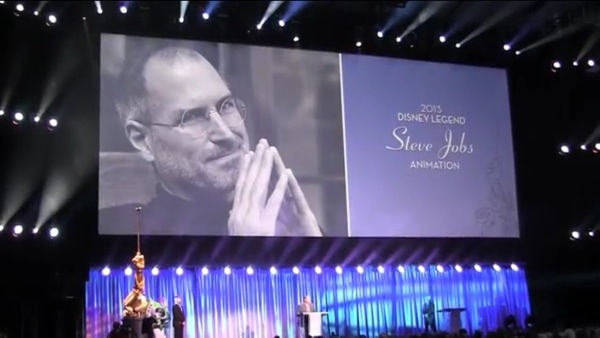
The Disney Legends Award is presented annually to a person who has left a significant impact on The Walt Disney Corporation. This year, the late Steve Jobs received the honor, and last night John Lasseter accepted the award on Jobs’ behalf at the D23 Expo. Lasseter is the Chief Creative Officer at Pixar, a studio Jobs co-founded, and Walt Disney Animation Studios. He created Toy Story and is arguably the most influential and iconic storyteller in the history of animation.

Continue reading → Pixar’s John Lasseter Emotionally Accepts Disney Legends Award For Steve Jobs [Video]

vox audio playlist

7 Savvy Business Apps You Can’t Live Without

Creating the best possible user experience is the goal of most successful smartphone apps. And if you’re running a small business, chances are you do a lot of your business while mobile. Your phone is practically your office as you manage files, payments and expenses. Free or inexpensive apps help get the work done and keep your organized and focused. Entrepreneurs, make use of these often free tools that help businesses grow and run smoother.

Continue reading → 7 Savvy Business Apps You Can’t Live Without

iOS 7 beta 5: Here’s what Apple’s Fixed : full change log now

Apple today released the fifth beta of iOS 7, which brings a number of improvements, changes, and bug fixes to the operating system, including newly redesigned Settings icons and a Control Center option that allows the feature to be disabled within apps.

iOS 7 beta 5 also offers a slew of minor interface tweaks and improvements that continue to make iOS 7 feel both faster and more polished. Our forum members have noted multiple enhancements that have been bundled into the release:

Settings – The icons in the Settings menu have seen a complete design, going from standard blue icons to a variety of square icons in various colors.


settings iOS 7 beta 5: Heres what Apple’s Fixed : full change log now

Control Center – Control Center’s settings now allow the function to be turned off while in apps, preventing Control Center from being accessed from the bottom of the screen while playing games or otherwise using apps.

ios7 controlcenteroptions iOS 7 beta 5: Heres what Apple’s Fixed : full change log now

Power Off – The slider bar that displays when the iPhone is being powered off has been slightly altered.

Twitter – The Twitter icon has been redesigned. Rather than a white bird on a blue background, it now depicts a blue bird on a white background.

ios7 twitternew iOS 7 beta 5: Heres what Apple’s Fixed : full change log now

Notifications – Banner notifications can now be pulled down to access additional information.

Phone – The icons that are displayed while a user is in a call have been slightly altered with the addition of circles around the icons. They also appear to be larger.

phone iOS 7 beta 5: Heres what Apple’s Fixed : full change log now

Accessibility Options – There are now On/Off toggle options under the Accessibility menu.

Boot Screen – When installing iOS 7 beta 5, many iPhone 5 users noted that the color of the boot screen matched their devices, with a white screen used for white phones and a black screen used for black phones. This differentiation appears to be limited to the iPhone 5 at this point in time as iPad owners and older iPhone users have not noticed the change.

Messages – In iOS 7 beta 4, Apple changed Messages to default to displaying the first name and last initial of a contact in a conversation. With beta 5, only the first name is displayed by default, though other options can be selected in the Mail settings menu (which is linked to Messages). To access the feature, go to Settings / Mail Contacts and Calendars / Short Name (under Contacts).

Additional features in iOS 7 beta 5 will be added here as they are discovered. Apple is likely to continue pushing regular updates for iOS 7, bringing minor performance boosts and changes ahead of the operating system’s public release, which is expected to come in the fall.