There’s several ways you can speed up your website, use a CDN, get a better host but none of that is going to help unless your images are properly optimised. JpegMini helps do just that, providing the optimum balance between compression, quality and clarity. If you used photoshop or Pixelmator and hit the file, export as jpeg function you could think that the jpeg defaults are set to optimal levels. Turns out this isn’t the case as theres more than one way to compress a jpeg for the best results
This is something I only found out thanks to the Mac And Forth podcast so I take no credit for this finding but JpegMini turns out to be a bit of a gem.
Jpeg mini is a small, easy to use program that shrinks down your jpeg image but proclaims to loose as little amount of the image detail as possible, all down to their own algorithms that look at all of the pixels in an image than taking just an average mix.
JpegMini
What this means in simple terms that JpegMini sees different shades of red as just that, different shades whereas programs like Photoshop tend to group reds in a more generalist sort of way and then clump them together.
Thanks to this more probing way at looking at the whole picture JpegMini claims to have less artefacts, color blow out and that annoying blockiness from things being over compressed. / blooming when you compress images with their app.
I’ve now realised I’ve been making a mistake for the longest time at pulling an image into Pixelmatr, applying a resize, then exporting the file with the default settings looking at the small preview window trying to guess the right balance of size vs quality. It takes a while to trust JpegMini to do the right thing as there’s no preview window, no quality settings just simply drag and drop the image.
So to test this I’ve pulled a selection of photos with varying colors and details for resizing and compression.
JpegMini has a default resize to 960 * 720 pixels, not enabled as default, with no other settings other than to where you want to save the new files.
So to test again Pixelmator, images were opened, resized and then exported as Jpeg twice. Once with default compression settings and then with the level of compression adjusted to match the file size of JpegMini for a true comparison
Not only does the file compression sizes speak for themselves but the quality of image is nothing to be sneeze at either. The amount of compression and clarity, clarity being a keyword here, is spot on.
All of the image and bandwidth savings come at a grand old price of free providing you don’t want to do more than 25 images in a day. A normal edition is available via in app purchase for £14.99 with no limit on the amount of images you can compress but is limited to images of 28 mega pixel or less. For those needing a multi user licence, plugin support and much, much more a pro version is also available with some seriously advanced features to boot with a price to match of £110.
If you want to take agenda at what Jpegmini can do with no uploads or perhaps take a snapshot of your website to see how much in terms of bandwidth / cdn costs you can save, JpegMini’s website will show you graphically what you can save. http://www.jpegmini.com/server
Overall.
Jpegmini represents fantastic value at being free if you want to do no more than 20 images a day.
If you’ve got a majorly busy website with CDN costs attached then JPEGmini is going to recoup its outlay in no time at all.
It;s hard to believe that with no tweaking or settings to play with images can get that compressed and still be as clear as they are.
JpegMini competently delivers in it’s promise to compress images without a major loss in clairty. Recommended.
JpegLite Is Free From The App Store JPEGmini Lite – ICVT Ltd. JPEG mini with more features, 50mp picture limit and unlimited conversions £14.99 JPEGmini Pro, Lightroom support, all cpu core processor support and MUCH, much more £109.99
We’re sorry, too many people are accessing this website at the same time. We’re working on this problem. Please try again later. If you’re trying to get to the apple seed site to grab a hold of the iOS 8.3 beta you might be in for a bit of a wait.
My thoughts. Why not just shove retina in the Macbook air?
I think it’s for people who want a general laptop for browsing the web, taking notes, creating powerpoints, doing emails..
It’s not got the power to video edit or anything like that
good for coders, business people who just need to use word, outlook and powerpoint? maybe also good for some students who need a very light, thin laptop for taking notes
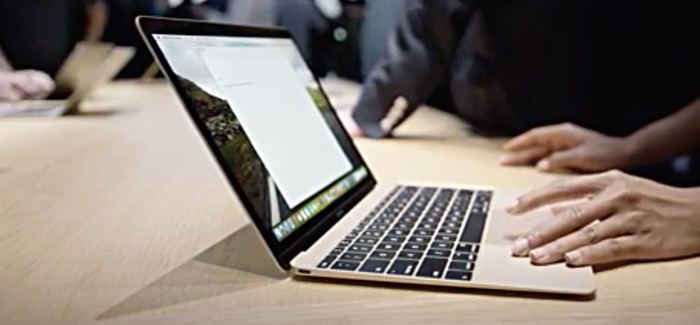
Thinner, lighter and 30% thinner than the Macbook air this new MacBook 12” pays more attention to detail than out and out GPU and Cpu performance. Force touch, a new keyboard and all day battery life all of which with Apple’s own tech.
There’s many way to stream full movies to your device for free. Popcorn Time was one and then PlayBox HD. PlayBox HD stopped working showing users a blank screen or crashing on start up but now it’s on the App store.
The full changelog for ios 8.2 is put so here’s what you can expect.
iOS 8.2 Changelog
The complete changelog is as follows:
The entire platform has been given the once-over, with a number of fixes across the board, and while it remains uncertain as to whether Apple will push iOS 8.2 this week or next, it seems unquestionable that it’ll arrive in the next few days.
When a company offers to store up to 50,000 of your music tracks it’s on offer well worth at least investigating. Wanted that company is Google and will probably be doing some data mining but still, if you’ve used Gmail you probably already signed your privacy away.
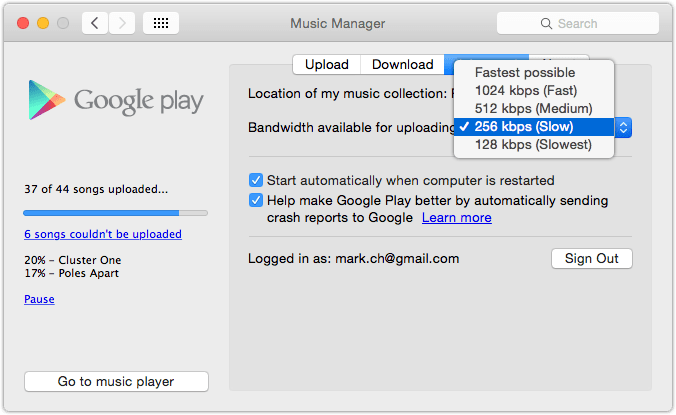
Using Google music is to act play. Is no all in one application to manage your music with Google so to get started you need to download the music manager up or install an extension for Google Chrome.
In Google Chrome with the extension installed you can pointed towards a folder containing your music but with the application you will actually give you the opportunity to sync your iTunes library automatically.
Google music as a major advantage over iTunes match is that it will scan your library and automatically aren’t any tracks Google already has to your collection without uploading them.
iTunes match takes a far more almost nethanderal approach of uploading your music any way and then replacing it with a higher quality version if available.
Given as my ADSL connection is only eight meg down and one Meg up I like this a lot.
.
This approach also means that music starts appearing in your Google play music library instantaneously ready for listening.
Is also means that music starts appearing in your Google play music library pretty much instantaneously ready for listening.
Just like iTunes match if the music uploaded as the bit rate of less than 320 kB it will automatically substitute it for a higher quality version. You can of course pull these tracks back time but in the free version of Google music you can only download it twice.
Unfortunately there is no real app for the mac to listen back to your music unless you count Google Chrome and using a browser and given just how cobbled together the music uploading app looks. It’s doubtful that there is one on the horizon.
For iOS devices there is Google’s native app offering simply called “playing music”and is everything you would want from a music player, clean navigation, responsive and well thought out. The interface also passes the ultimate test of can I use it whilst out walking my dogs.
Even with my 3G signal only showing to darts music playback is blisteringly quick.streaming stance with barely any noticeable lag and even randomly hitting skip forward and Skipback for music tracks there was never noticeable Pause.
A quick update: the only time I noticed appalls is if I jump from track one to let’s say track five.
Playlist support is a touch on the rudimentary side but should get you through. I find it better to do playlist management on the desktop and then let it seemed across devices.
Is no five-star rating system here instead you simply like or dislike a track which then influences music played in the instant mix section.
The in 1 For iphone 6 combines a sleek design with functional multi tools in one case. The in 1 protects your iphone while also offering a useful tool-set. The tools which are included are:
“Ive once sat next to J. J. Abrams at a boozy dinner party in New York, and made what Abrams recalled as ‘very specific’ suggestions about the design of lightsabers.”
Up for debate is just how helpful the Apple watch is going to be on it’s realease. According to sources who told the The Wall Street Journal that some of the features were too complicated, while others would have prompted unwanted regulatory oversight.
Of all the tablets out there that i’d consider the HP Stream 7 Signature Edition Tablet is right at the top of the list, make even more tempting because not only has it been reduced by £24, includes Office 365 but the Signature Edition means It’s fast, without junk and test software, and comes with an anti-virus software that never expires.
Dragon Dicate 4 for Mac has long since been a staple part of the blogging diet. Either recording thoughts for transcribing later on or pacing around using Dragon Remote Microphone for a wireless dictating experience, Dragon Dictate v4 has been freakishly accurate.