Page 4 of 5

How To Install OS X 10.8 Mountain Lion on Your Hackintosh

Mountain Lion Hackintosh How To Install OS X 10.8 Mountain Lion on Your Hackintosh

Personally for me it’s been awhile since I last delved into the murky waters of creating my very own Hackintosh.  I never seem to be able to get the right combination of hardware when you start looking at all the PC components out there you can potentially used to build your own PC which is Mac-based it easy to get overwhelmed. But that hasn’t stopped the active community over at tonymacx86.

Continue reading → How To Install OS X 10.8 Mountain Lion on Your Hackintosh

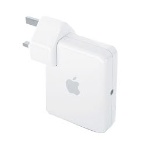
Airport Express

Fix: AirPort Express Invalid Radio Channel When Trying to Use 802.11n (5GHZ mode)

This has been driving me mad for the last few weeks. For some reason if you select 802.11n (5GHZ mode) and set the channel to be automatic you get the dreaded Invalid Radio Channel error message. It’s there in the drop down box so why on earth is it invalid? The solution is incredibly simple.

Continue reading → Fix: AirPort Express Invalid Radio Channel When Trying to Use 802.11n (5GHZ mode)

How to remove iMessage Lag

It was only a matter of time before someone breached the void between computer and phone. Why did it take so long for someone (Apple) to introduce a desktop messaging system that inter operates with a phone.

That being said it’s not perfect. Now and again it can lag when sending or receiving messages. The fix is simple if you experience this. If you installed Messages Beta, an early version of iMessage for the Mac that Apple released in February, uninstall it.

Somehow I missed the fact iMessage had been released officially it seems. Give it a try and let us know any feedback.

Adobe Flash Cpu Usage

How Stop Adobe Flash From Being Cpu Intensive (kinda)

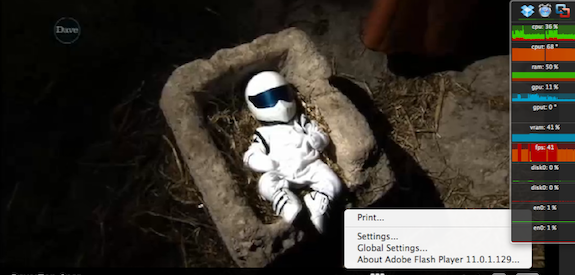
Whilst it may be a standard for the Internet, Adobe Flash also set a new standard for how quickly it can tax the CPU and drain your battery.

However the other day I made a simple discovery on how to reduce the CPU usage was watching any flash video. It seems that whilst watching a video and pressing right click to bring up the context menu your CPU usage can drop as much as 40%

Continue reading → How Stop Adobe Flash From Being Cpu Intensive (kinda)

Run OSX Lion on your iPhone (sort of..) with Ultimatum

We don’t often comment often on such areas like the jail breaking community however when we saw this one it definitely makes the grade as a news item.

Ultimatum Run OSX Lion on your iPhone (sort of..) with Ultimatum
Ultimatum - Lion on the iPhone

Not many readers will probably remember the old days of Windows Mobile. Microsoft’s attempts to bring a scaled down version of their desktop operating system to a small handheld device. This included features like the start button, movable windows and applications. Surprisingly enough it really didn’t work.

Introducing the ultimatum theme developed by Jdsss which brings the Lion desktop to your iPhone. Normally things like this are just a skin without much functionality and end up running applications already installed. Not only does the automated theme genuinely looks like Apple’s desktop operating system, but it also functions as if it was a genuine operating system.

You will find all the standard fare, such as finding menus, stacks, launchpad, scrollable docs and windows that can be dragged around exactly is if you were using a mouse or trackpad.

The ultimatum theme requires a jail broken device and is available from the ModMyi repo

Apple Mail V2 Location

How Do I Find My Apple Mail Signature Location In Lion?

I came across this little gem just the other morning when deciding to edit a few of the email signatures that I use.

Apple Mail V2 Location How Do I Find My Apple Mail Signature Location In Lion?Turns out that Lion moves the default mail location so somewhere different. If you want to edit your mail signatures navigate to..

/Users/YOURUSERNAME/Library/Mail/V2/MailData

There’s plenty of guides out there on how to edit your mail signature in Lion, sadly I no longer have a Lion installation to be able to help but if you have any hints or tips please email in.

Found this article useful? If so  why not give it a thumbs up below and help other side visitors?

Taming OSX Lion With Gestures

How to make the most of Lion gestures

lion taming How to make the most of Lion gestures
Taming OSX Lion With Gestures

Essential basic lion gestures.

Lion is really taking it to the traditional mouse and computer interaction we have all become accustomed to. Snow Leopard really did push me towards being more interactive with my desktop with more than three buttons and Lion makes even more use out of the track pad.

1.  Tap for dictionary.

The dictionary facility has been about for a number of Mac OSx incarnations. Previously he had to press command   control   D whilst hovering over a word. Lion simplifies this approach by allowing you to simply double tap on any word using three fingers

2.  Finder navigation using gestures.
Finder didn’t escape the briefest of makeovers in the lion operating system as opening the finder presents you with a Cover Flow style presentation of files and folders. To navigate through these items with a gesture, simply scroll up and down with two fingers to see the different groups and position your points are in a group and slide two fingers left or right on the trackpad to see different files in the sections.  As normal, when you see a file you want to work with, just double tap on it.

3.  Make the most of mission control.
Mission control is activated by simply swiping up four fingers on your track pad. Once in mission control, you can swipe left and right with three fingers to move between different desktop, spaces or any of the full-screen applications that are currently in operation.

If you have any hints or tips on how to manage Lion with gestures then please drop us a line with the comment form below

Apple's LaunchPad In Lion

How To Remove Applications From LaunchPad.

LaunchPad How To Remove Applications From LaunchPad.
Apple's Sneaking in iOS For The Desktop?

Launchpad may be Apple’s somewhat ham-fisted attempt at bringing a IOS look and feel to our beloved Apple desktops but unlike the implementation found on our own IOS devices there doesn’t seem to be a way to manage what’s shown on launchpad, until now!

As it stands launchpad will show every application in your applications folder as default.   The program selection  isn’t selective either, as it will show things like and installers and other updating software  programs.

Launchpad control is a system preference pane that takes all the hassle away from managing applications found on the launchpad menu system.

Managing the applications you wish to see on your launchpad is a simple case of taking and undertaking what you wish to see with the three fingered swipe

Best of all this application is free however the author would gladly accept any donations.

More information and download sources can be found at the developers website.

Mac OSX Lion 1 Click Installer

Make a Lion Bootable DVD / Flash Drive / SD Card In One Click

mac os x lion Make a Lion Bootable DVD / Flash Drive / SD Card In One Click

Developed by Guillaume Gete, Lion DiskMaker allows users to make bootable DVDs/USB flash drive/SD card of OS X Lion in a few outstandingly simple steps.

All you are required to do is ensure that the OS X Lion file you downloaded from the Mac App Store is in the /Applications folder.

The program asks the user if they want to create a bootable DVD or a flash drive; once they’ve decided the media, the app does the rest!

Another great advantage of this app is how you can use a 4GB flash drive instead of the previously minimum 8GB one.

From the official website:

Lion DiskMaker is a small application programmed with AppleScript that you can use with Mac OS X 10.6 or 10.7 to burn a DVD or build a bootable USB key from Mac OS X Lion’s Installation program.

As soon as you launch the application, it checks the presence of Mac OS X Lion Install in the /Applications folder, or tries to find one using Spotlight. Then, it proposes to build a DVD or create a USB bootable install disk.

Now that we’ve mentioned its good side, let’s talk a little about its limitation: Lion DiskMaker will not work if you’re on a Mac with OS X Lion pre-installed (like the new MacBook Air).

If you don’t have a copy of Lion available (the file is erased automatically when you move from Snow Leopard to Lion), you will have to download it again by opening up its page on Mac App Store and then pressing the Option/Alt key. This will allow you to download Lion again.

Lion DiscMaker is a free application and can be download from the link embedded below.

Download Lion DiscMaker
[Official Website]

How to delete objects from Time Machine backups

Delete Time Machine Items 1024x640 How to delete objects from Time Machine backups

Easier than you might think but why would you want to delete items, folders from Time machine.

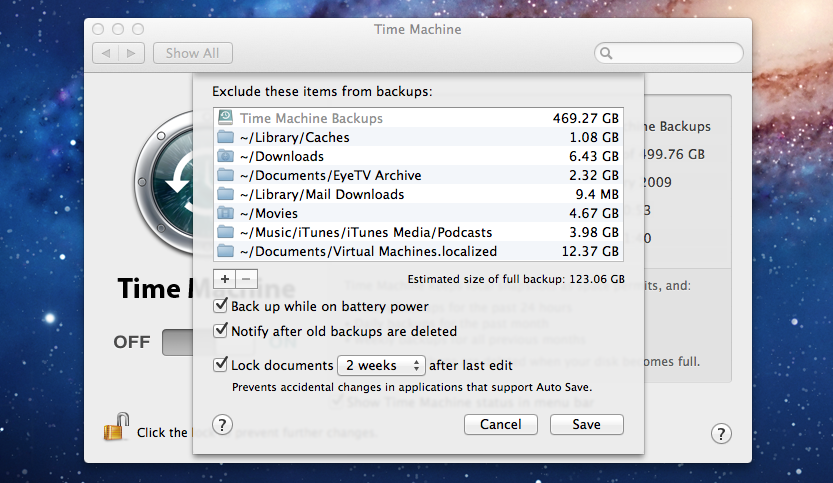
Just recently whilst testing Eye TV and the Equinux Tizi I made the mistake of putting recorded TV shows in my documents folder.  This was getting backed up each and every time.  Once I’d watched them I was deleting them so it was became a good idea to delete unwanted guff from my Time Machine.

We have a guide on what to exclude from Time Machine that you might want to take a gander at.

Open time Machine.

  1. Go to the top level — the first window; the one with your hard drive.
  2. Navigate to the backup you want to delete and use the Actions menu (gear icon) in the Finder’s toolbar. It has an option to delete the backup. Also, when using the Actions menu, with a file or folder selected, there is an option to delete all instances of the file/folder from all backups.
  3. You can right click and delete all instances as well.

If you have any Time Machine hints and tips please Yell US! or use the form below.


Time Machine Exlusion Areas

What Folders To Exclude From Time Machine Backup’s

Having never really used Time Machine before now I thought it was high time that I put the spare HDD I have lying about to use. Well more like I’m debating formatting my system to do a clean install of Lion and wanted a local backup for a change.  I’ve also included updated information for what folders to exclude from Mavericks and Yosemite backups.

Continue reading → What Folders To Exclude From Time Machine Backup’s